


 だるかぶ
だるかぶ
サンダルでスーパーカブ乗りの『だるかぶ』です!
ご訪問ありがとうございます。ゆっくりしていってね。(本ページは広告を含みます。)
ご訪問ありがとうございます。ゆっくりしていってね。(本ページは広告を含みます。)

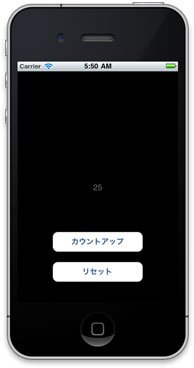
Titanium Mobile で、アプリを終了しても値を保持するカウンターのサンプルコードを書いてみました。
この記事の目次 非表示
サンプルコード
次のコードを app.js として保存し、実行します。
var Count = 0;
var win = Ti.UI.createWindow({ title:'Home'
});
var label = Ti.UI.createLabel({ text: '0', color:'#666', textAlign:'center'
});
var button = Ti.UI.createButton({ title: 'カウントアップ', width: 180, height: 40, top: 320
});
var reset_button = Ti.UI.createButton({ title: 'リセット', width: 180, height: 40, top: 380
});
// Add event part.
button.addEventListener('click', function () { Count = Count + 1; label.text = Count; Ti.App.Properties.setInt('SaveCount', Count);
});
reset_button.addEventListener('click', function () { Count = 0; label.text = Count; Ti.App.Properties.setInt('SaveCount', Count);
});
win.addEventListener('open', function(){ var TempCount = Ti.App.Properties.getInt('SaveCount'); if ( TempCount ) { // 値が存在する場合 Count = TempCount; label.text = Count; } else { // 値が存在しなかった場合 Count = 0; label.text = Count; }
});
// Add item to window.
win.add(label);
win.add(button);
win.add(reset_button);
win.open();
開発環境
Titanium Mobile SDK 1.7.5
iOS SDK 5.0
参考にさせてもらったページ
ありがとうございます。
現場からは以上です。それでは、またッ!!!
だるかぶ
最後までお読みいただきありがとうございます!
スキ・コメント・シェア・フォローなどで応援いただけると『だるかぶ』のやる気がアップします!
記事内容の修正について記載している内容は記事執筆時の情報です。
できるだけ最新情報を掲載するようにしていますが、情報が間違っている場合は「コメント」でご指摘いただけるとありがたいです。